 I recently got a reminder mail to vote for the Sourceforge.Net 2008 Community Choice awards. Going through the list of finalists, I realized how many of these support MySQL as the database backend. It truly amazes me when I look at the wide range of available OSS applications today as well as how advanced many of these have become! More and more commercial applications can nowadays be replaced with Open Source alternatives/equivalents. And many times, MySQL is used to store the applications' data. This is a great trend!
After looking through the list, I spent a few minutes to add the relevant applications to the Project list on MySQL Forge. This section of the Forge is supposed to become a complete, "one-stop" directory of Open Source projects and applications that support or work with MySQL. You can tag, comment and vote on entries as well as just browse through the list. If you have not looked at it yet, make sure to stop by next time you are searching for a particular solution!
Do you have a favourite Open Source application that supports MySQL and is missing from the list? Consider adding it - it only take a few minutes! Thanks for your support - your contribution is appreciated!
I am happy to announce that a new version (0.9) of mylvmbackup has been released. This is the first release since the source code has been moved from Subversion to Bazaar and is now hosted on Launchpad.net. I would like to thank Robin H. Johnson and Patrick Hahn for providing the patches that contributed to this new release!
mylvmbackup is a tool for quickly creating backups of MySQL server's data files. To perform a backup, mylvmbackup obtains a read lock on all tables and flushes all server caches to disk, makes an LVM snapshot of the volume containing the MySQL data directory, and unlocks the tables again. The snapshot process takes only a small amount of time. When it is done, the server can continue normal operations, while the actual file backup proceeds.
From the ChangeLog:
- Applied patch from Patrick Hahn: provide an option to call external scripts/applications (hooks) at various stages of the backup process. See the man page for instructions
- Added options "--skip_hooks" to disable the execution of hooks and "--hooksdir" to define the location for these (default is /usr/share/mylvmbackup)
- Updated documentation: added new options and instructions on how to use hooks
- Applied patch from Robin H. Johnson: Full support for an rsync:// service as the backup destination. If you include any path fragments with the rsync module name, they must already exist!
- Updated documentation to reflect these changes
- Updated TODO
You can download a source tarball or RPM from the project home page. Additional packages for various Linux distributions can be obtained from the openSUSE Build Service. Packages for Gentoo and Debian should appear shortly, too.
Enjoy! Please let me know how mylvmbackup works for you, either by posting to our mailing list or by submitting a bug report. Thanks!
Thankfully my RSS reader has builtin-search capability, so I can quickly skim the full RSS feed from blogs.sun.com for keywords of interest. I found the following articles quite helpful:
- Setting up MySQL Cluster using Solaris Zones by Hashamkha Pathan walks through the steps involved of setting up a virtual MySQL Cluster setup on a single Solaris instance (for evaluation purposes only - this is probably not the best idea for a productive HA environment)
- Mixing SQL and shell commands in MySQL by Amit Saha explains how to write scripts that execute both SQL statements and unix shell commands using the MySQL command line client
- Improving filesort performance in MySQL by Neelakanth Nadgir provides some background information about MySQL's filesort operation that is being performed when records have to be sorted using ORDER BY.
- Ubuntu, PHP, NetBeans - part I by Petr Pisl is the first part of an article series that will explain how to develop PHP/MySQL applications using NetBeans on Ubuntu Linux. This part describes the basic installation of the required LAMP stack components.
If you are would like to learn more on how to develop on NetBeans with using a MySQL Server and how to create web apps that use MySQL as a backend, take a look at these two tutorials:
Over on the Novell Cool Solutions pages (which are powered by Drupal, by the way), I found this introduction on how to set up MySQL replication by Damian Myerscough. It walks you through the steps involved in setting up a classical master-slave replication setup.
 Did you know that many parts of the MySQL web sites provide news and updates via RSS Feeds? Markus Popp from our web team did a great job on making some of these more visible by adding RSS icons to the respective pages. If you want to keep up with what's happing at MySQL, consider adding the following feeds to your feed reader:
Did I miss any? Do you know any other feed? Please let me know.
RSS feed readers exist for a wide range of platforms. I personally use Akregator, which is part of the KDE Desktop environment.
Last weekend I finally found some time to upload pictures that I had taken during various events that I attended in the past few months. So here are my impressions from the following events:
These are probably the last pictures that I have taken with my trusty old Pentax Optio S4 - I just received my new camera, a Canon PowerShot A720 IS. I have just started to toy around with it, but the first results look promising! The Pentax served me well for several years - I've taken 9745 pictures with it. But it had a few deficiencies, particularly the slow startup and flash recharge time and the bad quality of pictures indoors bothered me for quite a while. But it is very small and handy and the metal housing makes it quite sturdy.
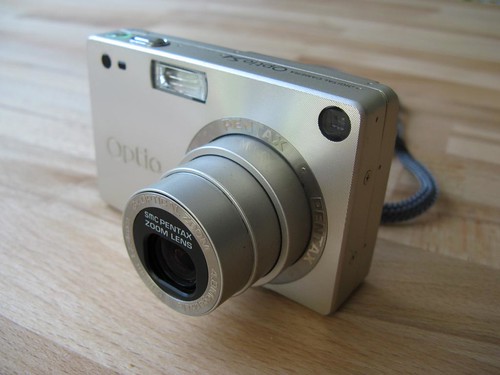
The first picture taken with my new camera: a picture of the old one.

And probably the last picture taken using the old camera: my new Canon.
